Simple, usable web analytics.
GA4 records what people do on your site. Search Console records how they find you on Google. Omniview Analytics brings both into clear, live reports the whole team can read.
No credit card required. Connect GA4 in minutes.
Your analytics has the answers. Your team just can't get to them.
GA4 and Search Console each gather a different part of the picture. GA4 is deep and flexible, built to capture everything people do on your site. Search Console is built to show how your site shows up on Google. Most of the team just needs a few answers from each, quickly, without learning two tools first.
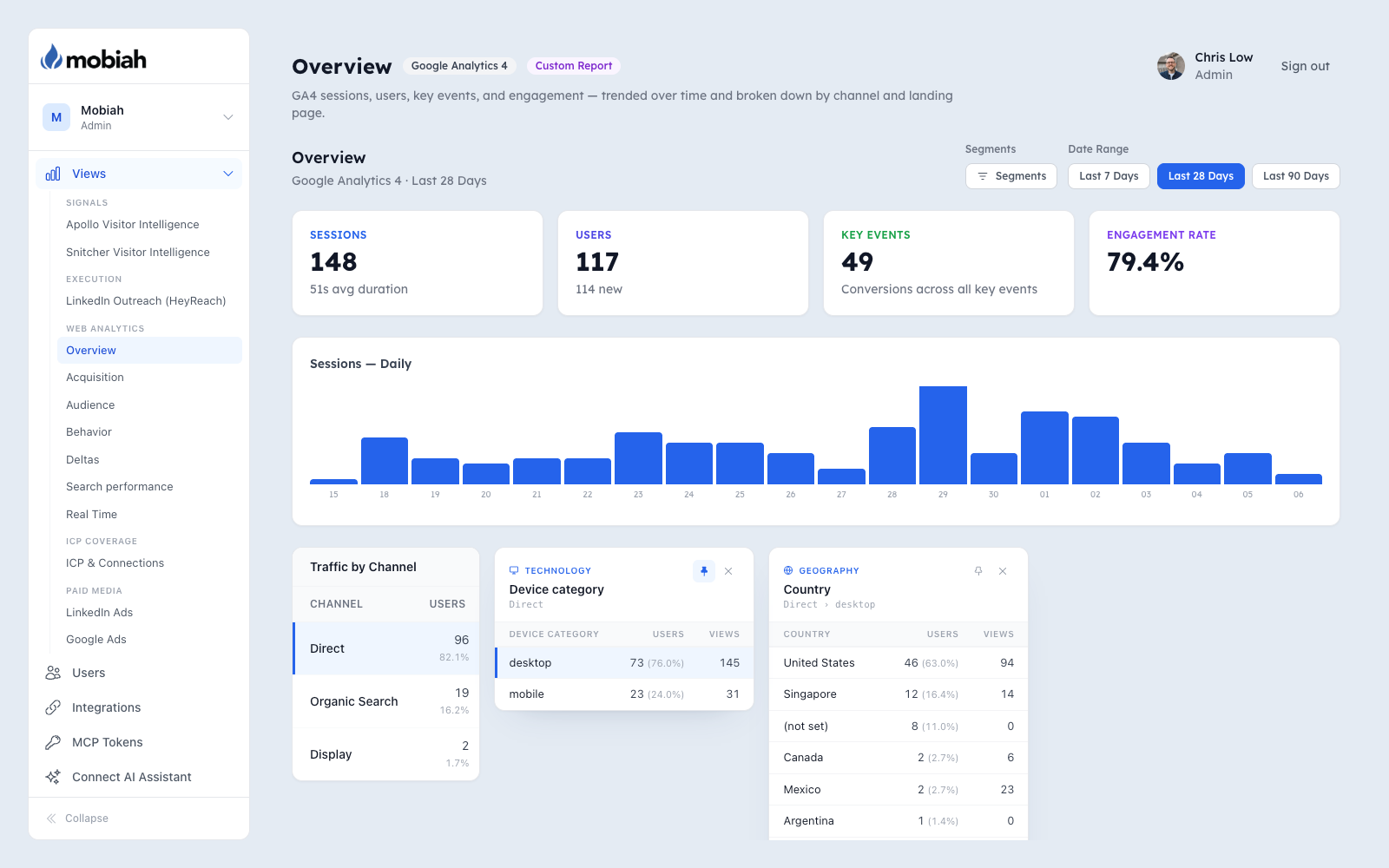
Omniview Analytics lays out the reports people actually reach for, ready to open.
Example report, with sample data
Everything your team checks in analytics, plus company reports once that data is in GA4.
Weekly briefing
Digital Overview
Whether the site is up or down this week, this month, or this year, and why.
Core reports
Real Time
Who's on the site right now, what they're reading, and where they are.
Organic search
Google Search performance
Clicks, impressions, click-through rate, and position for brand and non-brand searches.
Core reports
Channels
Which channels bring people to your site.
Core reports
Campaigns
How each campaign performs, from visit to conversion.
Core reports
Referrals
Which other sites send you visitors.
Core reports
Audiences
How your GA4 audiences use the site.
Core reports
Demographics
Visitor age and gender, where GA4 has it.
Core reports
Language
The languages your visitors browse in.
Core reports
Geography
Where in the world your visitors are.
Core reports
Technology
The devices, browsers, and systems they use.
Core reports
Landing Page
Where visitors arrive, and how those pages perform.
Core reports
Events
Everything visitors do on the site, counted.
Core reports
Key Events
The actions you count as conversions.
Core reports
Site Search
What visitors search for on your site.
Firmographics
Companies
Which companies visit, once that data is already in GA4.
Firmographics
Domains
Visitors by company domain, once that data is already in GA4.
Firmographics
Industries
Which industries show up, once that data is already in GA4.
Firmographics
Sizes
Which company sizes engage, once that data is already in GA4.
Your data, made readable.
Everything within reach
It's the same GA4 and Search Console data you already collect, laid out so anyone on the team can use it. Nothing is hidden behind a model you can't inspect.
Drill down without building a thing
Click any row to break it down by channel, campaign, country, device, browser, or day of week. Company, domain, industry, and size appear in that menu only after company data is already in GA4 and mapped. Each breakdown shows users and their share, and you can keep drilling.
Your segments, every report
Build your own segments and pin them, and they apply across every report.
Already sending company data to GA4? Put it to work.
Example data
Companies, by active users
Example data
Top industries, by active users
Example data
Active users, by company size (employees)
- 1–10214
- 11–50386
- 51–200452
- 201–500318
- 1,001–5,000241
- 5,001–10,000126
- 10,001+287
Companies
The named companies visiting your site, with active users and engagement for each.
Domains
The same view by company domain, for matching visitors to accounts in your CRM.
Industries
Which industries your traffic comes from, ranked, so you can see if you're reaching your market.
Company size
Small business, mid-market, or enterprise: which segments actually engage with your site.
Visitors without company data are grouped as “Not Identified”, so your totals still add up.
Bring the company data you already collect
Many teams already send company details into GA4: a visitor-identification tool, an enrichment script, or your own tagging adds the company name, domain, industry, or size as a custom dimension. GA4 stores that data, but its standard reports rarely surface it. Omniview Analytics turns those custom dimensions into reports the whole team can read.
Map it once, and the reports turn on
An admin maps each GA4 custom dimension to a company field in Omniview's GA4 settings: company name, domain, industry, or company size. Each report appears under Audience after its field is mapped. Connecting GA4 alone does not turn them on. No SQL, and no changes to your GA4 setup beyond the dimensions you already have.
Break down anything by company
Once a field is mapped, it also shows up in every drill-down menu. You can take any page, channel, or campaign and see which companies, industries, or company sizes are behind it.
One flat price. No meters running.
No per-source fees
Most dashboard tools charge per data source, per client, or per credit. Omniview Analytics is one predictable price, and the bill stays put as your traffic grows.
No seat limits
Analytics is most useful when everyone can see it. Sales, marketing, and leadership all get the same live view, with no per-seat charges.
Standard support
Questions or problems? Send a request from the support form inside Omniview and our team picks it up from there.
Start with analytics. Grow into Professional.
Professional keeps every Analytics report and adds four modules, Claude access, and expedited support, all in the same portal.
Nothing to migrate. Upgrade in-app whenever the team is ready.
- 01
Attribution
Your HubSpot pipeline and email domain coverage measured against your ideal customer profile, so you can see which target accounts are in play.
- 02
Execution
Email and LinkedIn outbound performance from Instantly, HeyReach, and Valley, in one place.
- 03
Signals
The companies Apollo, Snitcher, and Factors each identify on your site, all in one portal.
- 04
Paid Media
LinkedIn Ads and Google Ads spend, impressions, clicks, and conversions by campaign.
- 05
Claude over MCP
Ask Claude about your synced accounts, site visitors, and ICP pipeline in plain language.
- 06
Expedited support
A dedicated support email address for your team.
GA4 stays in your property.
Analytics reports query GA4 at runtime. Omniview does not copy those reports into a warehouse.
SOC 2 Type II in progressRead at runtime
GA4 reports read your property at runtime, encrypted in transit, and are shown to authorized users. Those reads are not stored as a copy of your analytics.
You control access
Role-based access control, MFA enforcement, IP allowlisting, and Google OAuth, all configurable per tenant.
Isolated by tenant
Every client gets their own tenant, their own login, and their own data boundary. Nothing is pooled or shared across accounts.
One flat price per plan. Upgrade whenever you're ready.
No per-seat, per-source, or per-credit fees on any plan. Annual pricing bills ten months up front and covers twelve. Every plan starts with a 14-day free trial, no credit card required.
Analytics
Clean, live GA4 and Search Console reports the whole team can read, in a portal anyone can pick up.
$82/ month*
- Every Web Analytics report, including Digital Overview and Search performance
- Drill down from any page to its source
- Unlimited team members
- No per-source fees
- Standard support
- 14-day free trial, no credit card
Professional
Everything in Analytics, plus attribution, outbound, visitor signals, and paid media, with Claude access to your accounts and attribution reports.
$290/ month*
- Web Analytics and Attribution
- Execution, Signals, and Paid Media
- Claude access over MCP
- Unlimited team members
- Expedited support
- 14-day free trial, no credit card
Enterprise
Everything in Professional, plus custom modules for the data only your business has and a direct line to our team.
$665/ month*
- Everything in Professional
- Custom modules
- Claude access over MCP
- Unlimited team members
- Priority support
- 14-day free trial, no credit card
* Annual pricing. Pay-as-you-go is $99 / $349 / $799 per month.
Apollo enrichment uses your own Apollo credits.
Questions about Omniview Analytics
A Google Analytics 4 property and permission to connect it. Connect GA4 during setup and your core reports are ready in minutes. Search Console is optional; connect it whenever you want search reports.
Reclaim your analytics.
See your website the way your team wishes analytics looked.
Connect Google Analytics and you'll have live reports the whole team can read. GA4 reports query live. Search Console is optional, and company reports appear only once that data is already in GA4. No credit card required.